
Learn how to spot phishing emails in under 30 seconds with this actionable checklist. Protect yourself with quick tips and CyberPup’s scam recognition modules.
Date: 09/10/2025
Introduction
With over 3.4 billion phishing emails sent every day worldwide (Comparitech, 2024), and phishing accounting for 36% of all breaches (Verizon’s 2024 DBIR), it’s clear that this phishing isn’t going away anytime soon. Why? Historically it has been cheap and easy to set up systems to spam peoples inboxes. Today, cybercriminals can buy phishing kits and mail services to launch large-scale campaigns with minimal technical skills. Attackers send out huge volumes of emails, relying on a small percentage of people falling victim, which still turns a profit.
Threats and tactics continue to evolve with the rise of AI tools, lowering the barrier even further. These tools make phishing emails more convincing, even in languages attackers don’t speak. Non-technical users are especially at risk, but even experts can fall victim. Email providers block most malicious emails, but some slip through. So what can you do? Read on and we’ll show you how to spot if an email is fake in under 30 seconds, then test your skills with a trusted Google quiz.
Note: it’s recommended to use strong passwords that are unique for each of your accounts (using a password manager) alongside enabling Multi-Factor Authentication on your important accounts like email/banking to negate most of the risk of phishing attacks pose.
Key Takeaways / What You’ll Learn
• How to identify the most common red flags of phishing emails in under 30 seconds.
• Quick actionable checklist to review every suspicious email.
• Examples of real-world phishing attempts broken down step-by-step.
• Put your knowledge to the test with an interactive quiz.
The 30-Second Phishing Email Checklist
Phishers are using artificial intelligence to write emails that sound natural and personal. Perfect grammar and a friendly tone no longer guarantee safety. That’s why we’ve put together a checklist you can complete in under 30 seconds to verify a suspicious email. The acronym to remember is ‘SUURE’. Next time you receive a questionable email, run through the checklist:
• Suspicious sender address: Look for misspellings or unusual domains (e.g., amaz0n.com instead of amazon.com). (CISA)
• Urgency or threats: ‘Your account will be locked in 24 hours’ is a common phishing tactic.
• Unexpected links/attachments: Hover over links to preview the real destination. Never open attachments from unknown senders. (EFF)
• Requests for sensitive info: If an email asks for passwords, credit card details, or other sensitive data, don’t reply. Instead, call the company using the official phone number from its website or app.
• Errors in spelling or logic: These can still occur, even in AI-driven emails. If something doesn’t make sense, trust your instincts and verify directly with the provider.
Real Examples of Phishing Emails
Attackers often copy branding or logos but send from unofficial domains. For example, a PayPal logo may be used with an address like ‘[email protected]’. Phishing simulations show even trained employees can click on malicious links, so vigilance matters more than confidence.
Sometimes attackers spoof your email address to make it look like a message came from you. This does not mean your account was hacked. To confirm, check your ‘Sent’ folder. If you don’t see the email, it’s fake. You can also review your account’s recent sign-ins for peace of mind.
Example 1
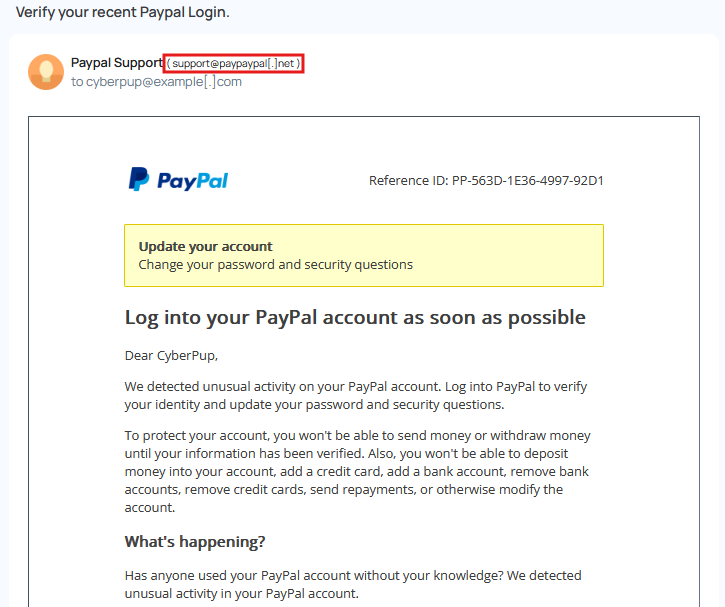
• Suspicious sender address: ✅ Official branding, but the sender address does not match.
• Urgency or threats: ✅
• Unexpected links/attachments: –
• Requests for sensitive info: –
• Errors in spelling/grammar: –
Example 2
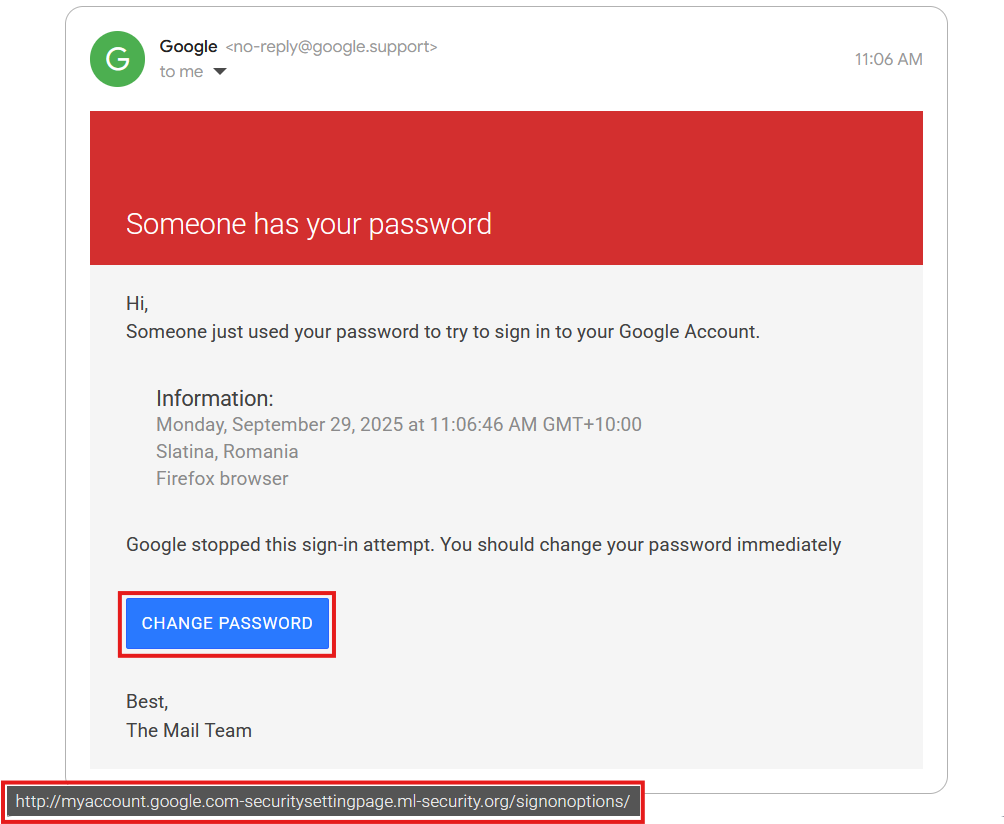
• Suspicious sender address: ✅
• Urgency or threats: ✅
• Unexpected links/attachments: ✅ Hovering over ‘change password’ shows a fake Google URL.
• Requests for sensitive info: ✅
• Errors in spelling/grammar: –
Example 3
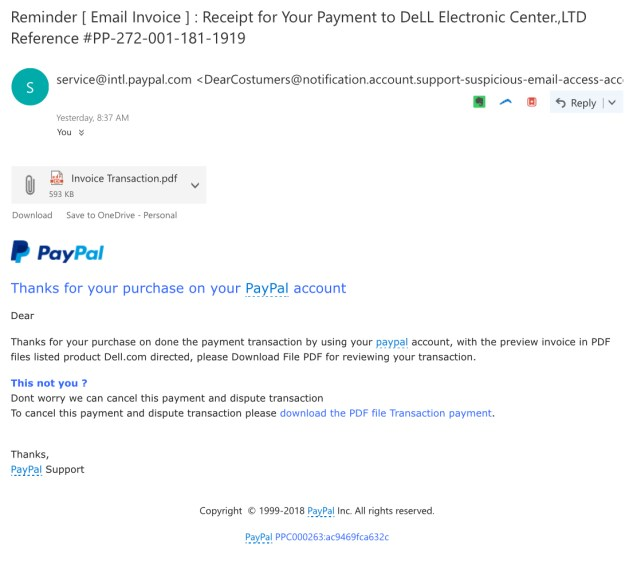
• Suspicious sender address: ✅
• Urgency or threats: ✅
• Unexpected links/attachments: ✅ Unexpected attachment with generic message ‘Invoice Transaction’.
• Requests for sensitive info: –
• Errors in spelling/grammar: ✅
Ready to test your knowledge? Run through this interactive phishing quiz from Google. It’s safe, free, and requires no personal information
https://phishingquiz.withgoogle.com/
Common Myths About Phishing
• Myth: ‘I can always tell a phishing email.’
Reality: Even pros fall for sophisticated phishing that uses convincing domains and cloned websites. (Verizon DBIR 2024)
• Myth: ‘Phishing only targets older or non-technical people.’
Reality: Everyone is a target, including IT admins and executives. (FBI IC3 2023)
• Myth: ‘Clicking a phishing link is harmless if I don’t enter info.’
Reality: Some links deliver malware instantly or trick you with hidden downloads. (EFF)
• Myth: ‘A website is safe if it shows the padlock/HTTPS.’
Reality: HTTPS only means the connection is encrypted. It does not prove legitimacy.
FAQs
Summary
• Always check the sender’s email address and verify links before clicking.
• Pause before acting on urgent-sounding messages.
• Never share passwords or personal info by email.
• Enable multi-factor authentication (2FA).
• Use CyberPup’s scam recognition modules to practice spotting phishing attempts safely.
Local & Country-Specific Reporting Resources
• United States: CISA or FBI IC3.
• Australia: Scamwatch (ACCC) or the Australian Cyber Security Centre (ACSC).
• United Kingdom: Action Fraud.
• Canada: Canadian Anti-Fraud Centre (CAFC).
• European Union: Local national cyber security centers.
References / Citations
• CISA: https://www.cisa.gov/secure-our-world/dont-get-hooked
• NIST Cybersecurity Framework: https://www.nist.gov/cyberframework
• EFF – Avoid Phishing Attacks: https://ssd.eff.org/en/module/how-avoid-phishing-attacks
• Verizon 2024 DBIR: https://www.verizon.com/business/resources/reports/dbir/
• Comparitech Phishing Statistics 2024: https://www.comparitech.com/blog/information-security/phishing-statistics-facts/